
Loom
Three agents. One Loom.
Monitor your local AI coding agents from one native macOS menu-bar app.
Watch Loom in Action
Experience local session discovery, real-time quota telemetry, and desktop widgets in 35 seconds.
What are all my local AI coding agents doing on my Mac right now?
When you juggle multiple autonomous agents across terminals, editor extensions, and language servers, visibility evaporates.
Terminal & Process Sprawl
Codex in VS Code, Claude Code in Terminal tabs, and Antigravity running background helpers. Loom discovers all active agent processes and groups them into clean, logical project sessions.
Invisible Rolling Quotas
Hitting 5-hour rolling rate limits in the middle of a refactor breaks momentum. Loom surfaces truthful quota percentages and exact countdowns to your next reset window.
100% Local & Ephemeral
No Loom account, no cloud relay, and zero telemetry SDKs. Loom is strictly read-only, communicates over local stdio and loopback HTTPS, and never persists sensitive provider tokens.
Local Agent Sessions
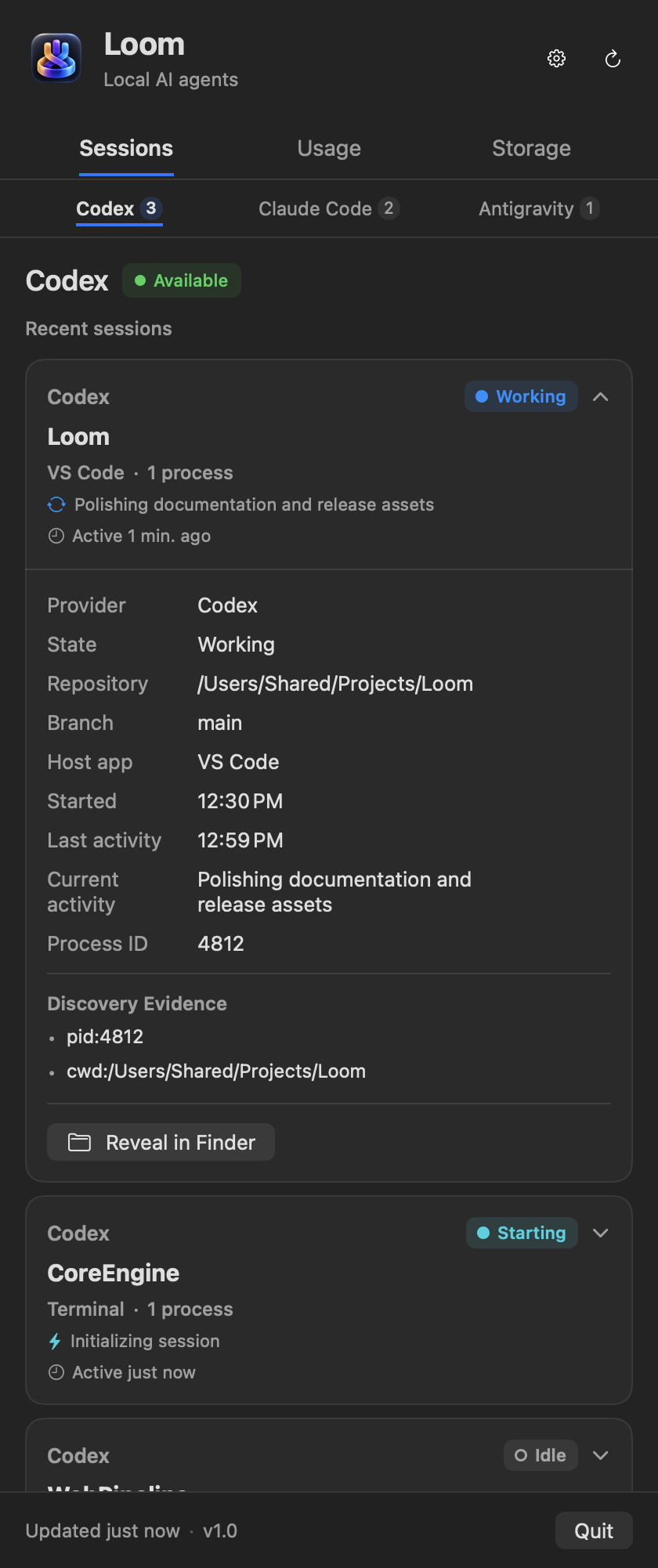
Know immediately which repository each agent is editing, what phase it is executing, and when it needs your input.
-
Glanceable Provider Selector Switch between OpenAI Codex, Anthropic Claude Code, and Google Antigravity with live session counters.
-
Normalized Lifecycle States Truthful status indicators for
working,idle,waiting for input,starting,finished, andfailed. -
Process Tree & Directory Inspector Expand any session to inspect helper PIDs, host apps, Git branches, working paths, and a one-click Reveal in Finder action.
Usage Quotas & Local Storage
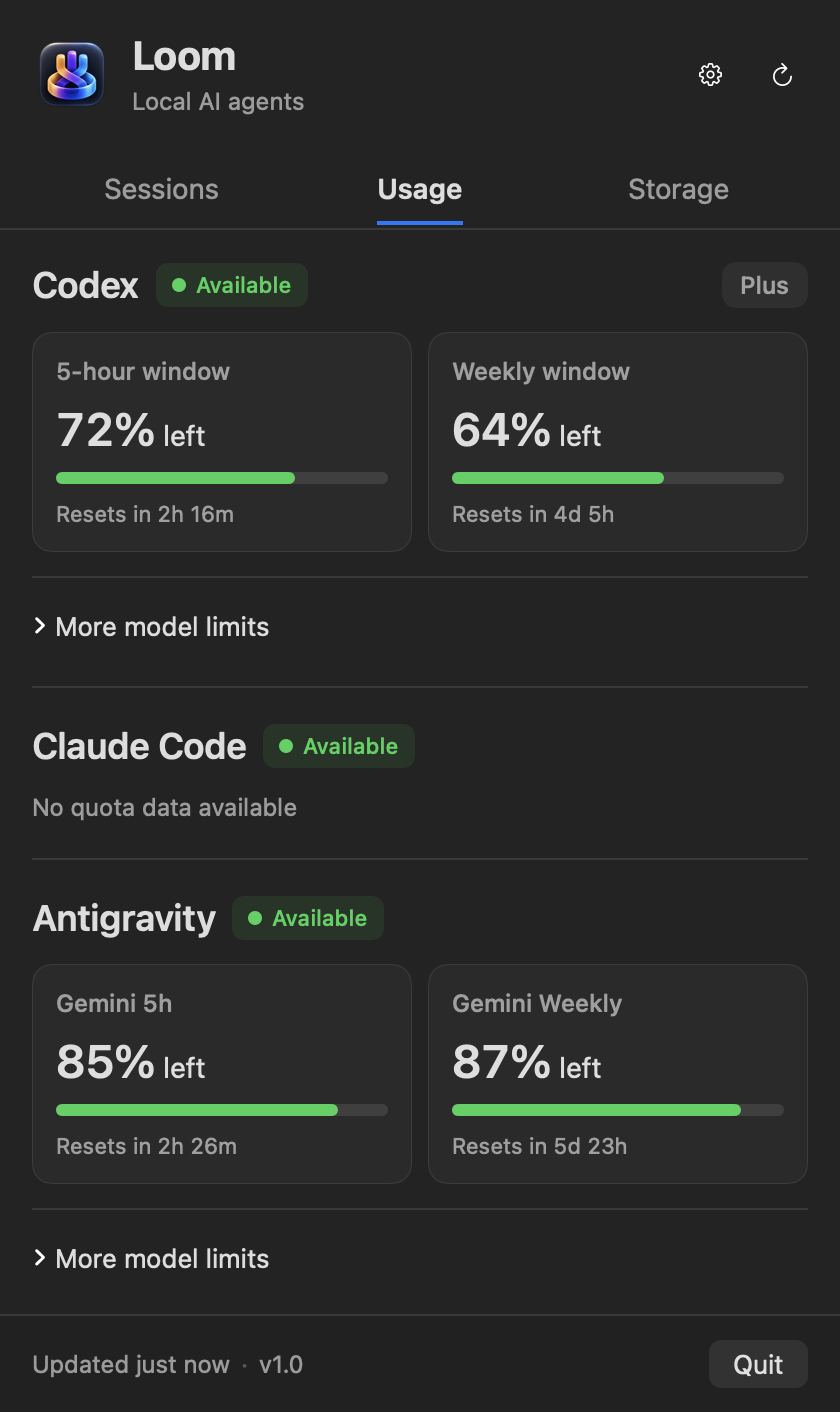
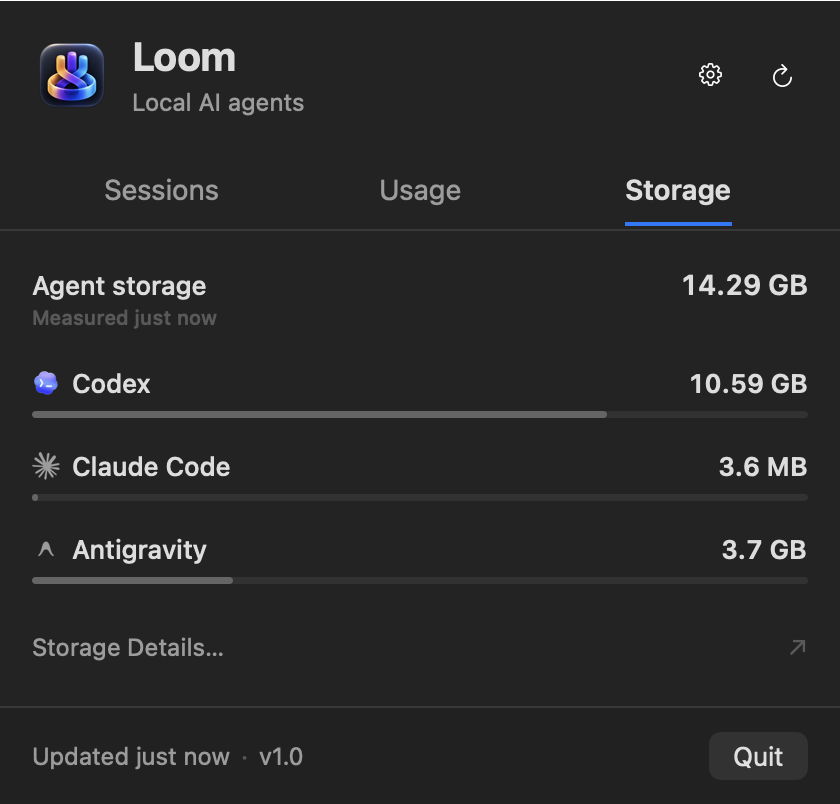
Track rate limits and inspect agent disk consumption without touching terminal commands or third-party web portals.
-
Truthful Live Quotas View remaining percentages and reset windows for standard and premium models (GPT-4o, o1, Gemini 1.5 Pro). Unsupported providers like Claude Code are honestly labeled rather than displaying fake zeros.
-
On-Demand Local Storage Audit Measure allocated disk space across agent stores, transcript logs, and cache folders. Scans run cooperatively in the background without reading file contents or traversing symlinks.
-
Path Concealment Mode Mask repo directories and sensitive disk paths with one toggle in Settings for secure screen sharing and live streaming.
Native macOS Widgets
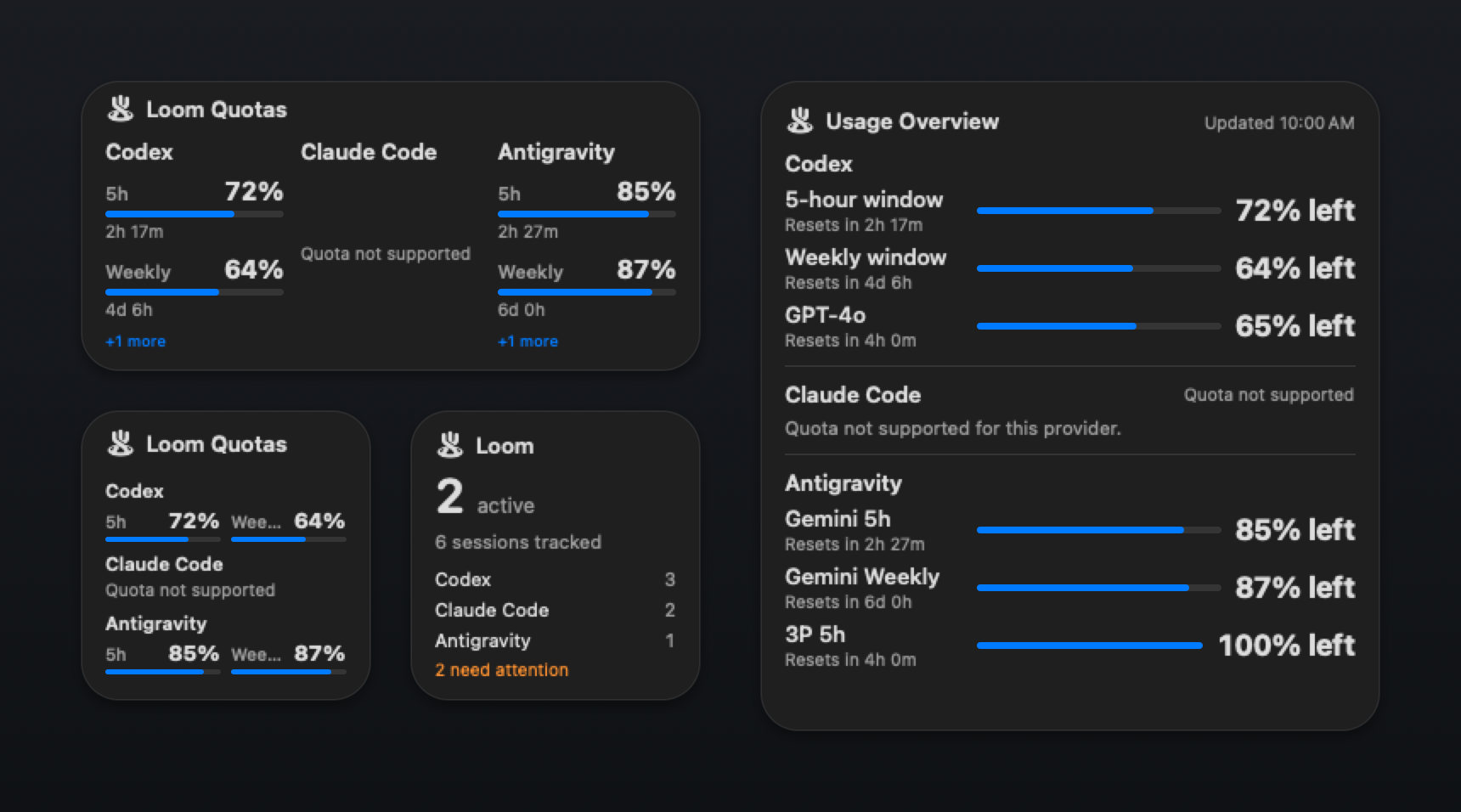
Keep agent activity and remaining quotas in your peripheral vision across desktop spaces and Notification Center.
-
Three Dedicated Widget Families Choose from Loom Sessions, Loom Quotas, and Loom Usage Overview across Small, Medium, and Large families.
-
Configurable Provider Targeting Monitor all enabled providers simultaneously or configure a widget to follow a specific coding agent via native Edit Widget controls.
-
Native WidgetKit Fidelity Built with pure SwiftUI for macOS Sonoma. Adapts automatically to Light, Dark, and desktop tinting modes with zero CPU overhead.
Supported Providers
Loom connects directly to local runtimes using verified OS evidence and official local IPC.
| Provider | Session Discovery | Quota / Usage Interface | Storage Accounting | Status |
|---|---|---|---|---|
|
OpenAI Codex
|
Running processes, child process tree & Git repository metadata | Local app-server interface over stdio | Caches, session data, and execution logs | Implemented |
|
Anthropic Claude Code
|
Running CLI processes, process hierarchy, active workspaces & transcripts | Not exposed by upstream CLI | Configuration roots, session state & transcripts | Implemented |
|
Google Antigravity
|
Local session metadata & language-server processes | Local language-server interface over loopback HTTPS with ephemeral token | Store database, session artifacts & diagnostic logs | Implemented |
Loom is an independent open-source project and is not affiliated with or endorsed by OpenAI, Anthropic, or Google.
Install Loom on your Mac
Choose between the official Homebrew tap or a signed, notarized disk image.
Homebrew Cask
Install and keep Loom updated using Homebrew through the official tap:
brew install --cask chaiwithcode/tap/chaiwithcode-loom
Direct Download
Download the standalone disk image with Apple Hardened Runtime:
Built for Developer Privacy
Loom is crafted with a strict local-first architecture to protect your code and credentials.
No Accounts, Zero Telemetry
There is no sign-in, no Loom user database, and no cloud server. Loom embeds zero tracking, analytics, or behavioral telemetry frameworks.
Strictly Read-Only Inspection
Loom never executes prompts, writes code, modifies agent sessions, or approves dangerous CLI operations. It inspects local runtime state purely for monitoring.
Ephemeral Memory Tokens
Loopback authentication tokens for Google Antigravity language-server endpoints are retained strictly in memory and are never written to disk or logs.
Path Concealment Mode
Mask absolute filesystem paths and project folder evidence across all menu views with a single toggle in Settings (⌘,) during presentations and recordings.